Syntax
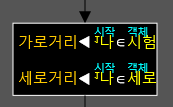
•You can create an syntax by entering a key in the function execution area.
•In the syntax, you can change the value of a variable or execute another function.
•The object to which the variable belongs is displayed above the variable.
•You can access the object's member variables and functions by entering ; at the object variable.
•You can access the object's static variables and static functions by entering the object name followed by ;.
•When changing the value of a variable, enter the key : and the symbol ◀ will appear. The value on the right will be saved on the left.
• You can enter a string by pressing the " key. You can exit by pressing the left or right arrow keys. A string can be assigned to a constant 2-byte array pointer or array reference.
•You can type convert by writing a variable and pressing Alt T. If the type conversion is invalid, 0 is returned.
•You can select multiple execution statements by dragging, and in this state, you can input Ctrl ↑ to move up or Ctrl ↓ to move down.