Condition
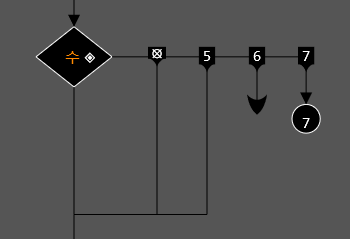
•Create with the Alt I shortcut. You can select the branch you want with the arrow keys. You can create a new branch by pressing Space. Move to the phrase below the branch with ↓.
•Syntax that can write syntax inside, such as conditional statements, can be created by selecting multiple syntaxes and including the selected syntaxes.
•Move to the branch with the same value as the conditional statement, and if not, move to the branch below.
•You can terminate a function in a branch by using the Alt Enter shortcut. If there is a return type, it must return a value.
•You can raise an exception in a branch by pressing the Alt Q key. When an exception is raised, all statements are ignored until it is handled.
•Basically, there is a bottom branch and an empty right branch. The right branch is empty and executes when it is 0. So basically, it executes when the right is false and the bottom is true.